
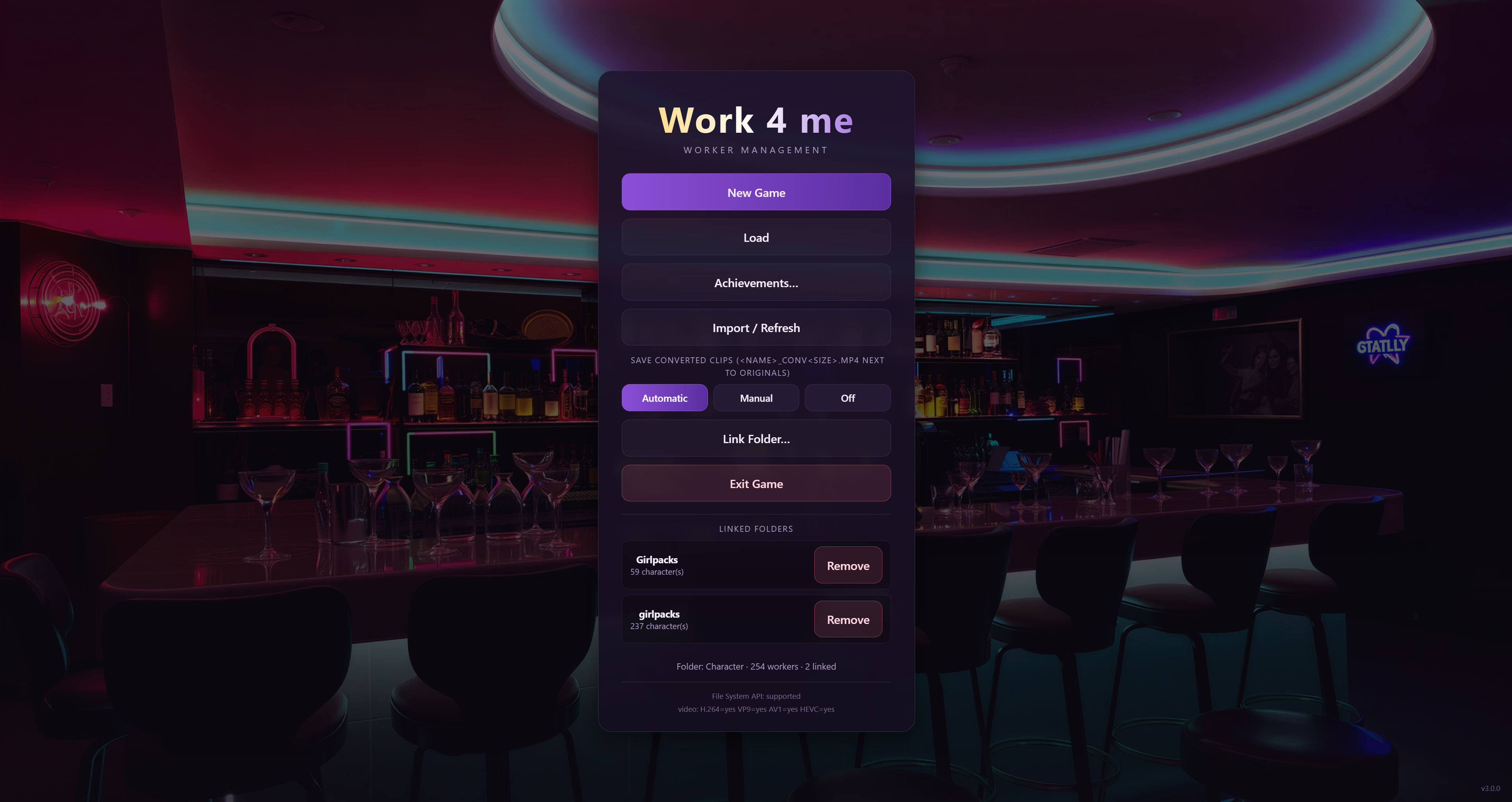
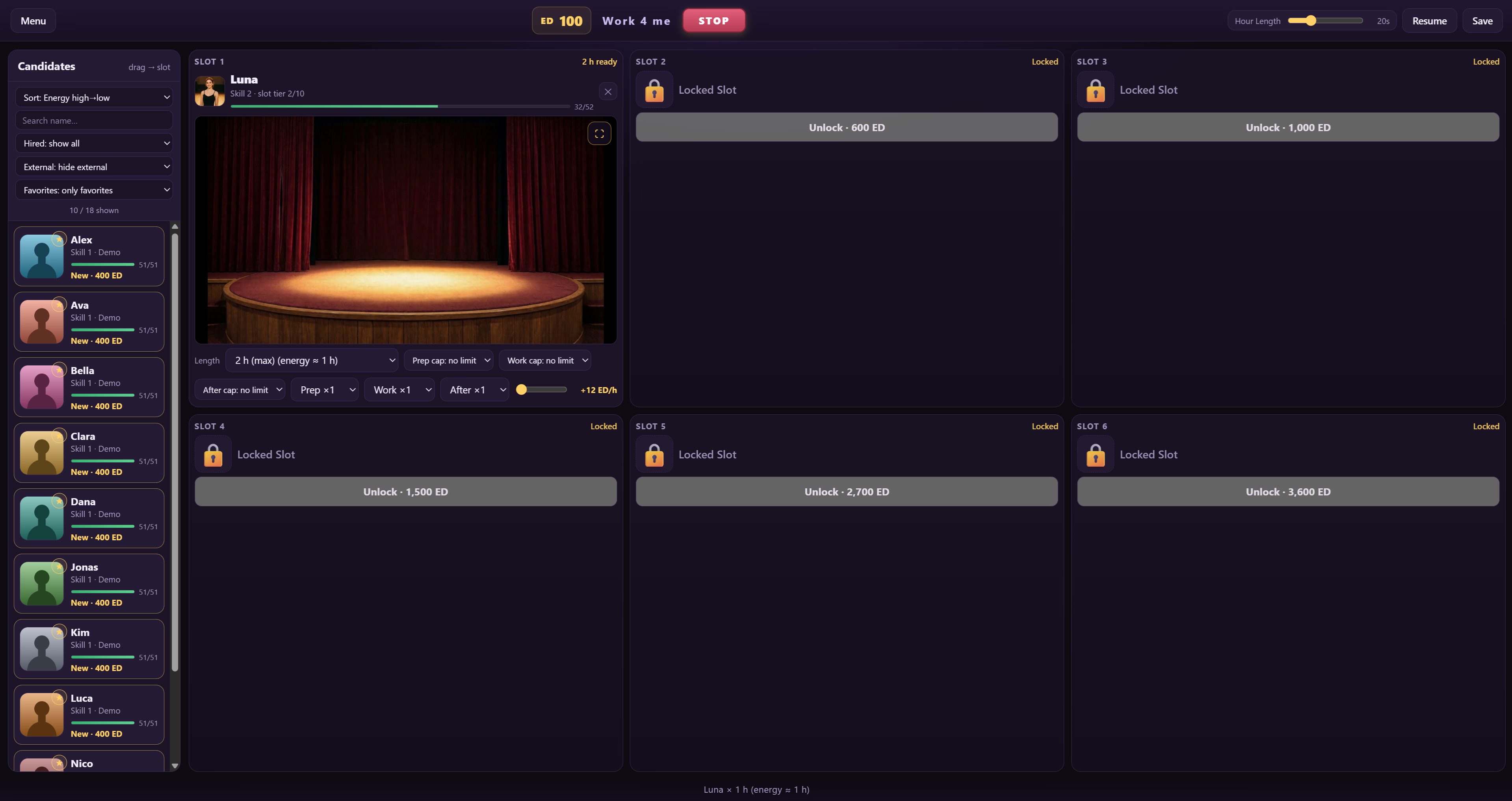
Work 4 me is a work-management game inspired by Venus’s Club. Hire workers, staff six slots, run workdays and grow their skills .
The game is fully Girlpack-compatible: point it at the folder that contains your Girlpack folder and every pack is auto-detected.
The characters and their clip libraries are the center of everything — the game itself ships without a story and without fixed content, and that is by design: the folders you connect decide who the workers are and what they do.
Thread Updated: 2026-10-16
Release Date: 2026-10-16
Developer: Bü
Censored: No
Version: 0.9.9
OS: Windows, Linux
Language: English
Genre:
See More
Management, Strategy, 2D Game, No Sexual Content, ai cg
Installation:
See More
1. Extract and run.
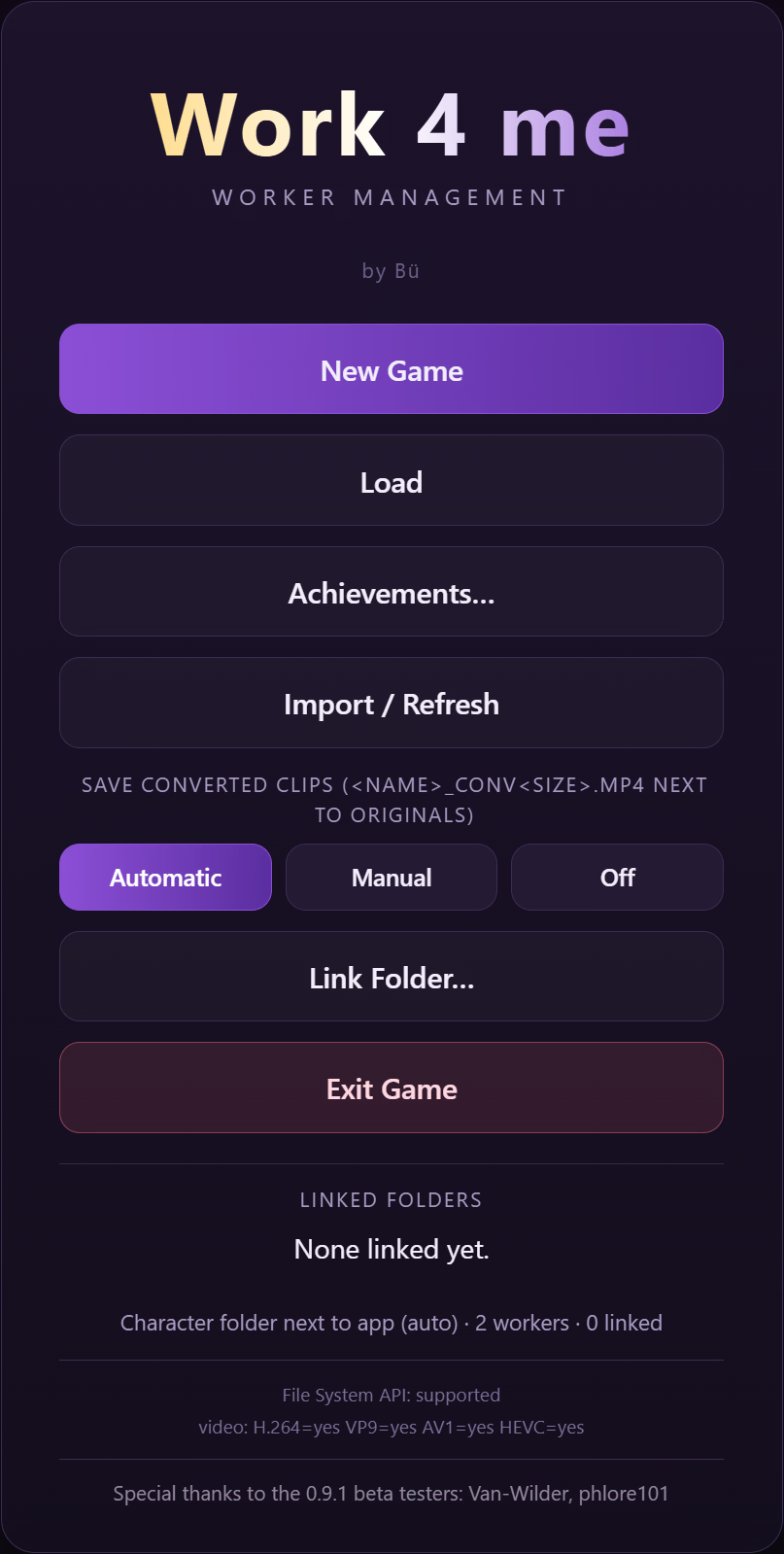
Your saves and your Game Info (Girlpack.txt, Menu.png) live in folders next to the exe. If you update from an older version, your existing files are copied there automatically on first start — nothing to move by hand.
Changelog:
See More
=====================================================================
Work 4 me — Changelog 0.8.4 -> 0.9.9
=====================================================================
This is the first public update since 0.8.4. It lists everything that
changed between 0.8.4 and 0.9.9.
Save & files, the new layout
– Saves and Game Info (Girlpack.txt, menu image) now live NEXT TO the
EXE, not inside your Character folder anymore:
<folder with the exe>Saves <- all your save files
<folder with the exe>Game Info <- Girlpack.txt, Menu.png
Your Character folder is now purely for content (character folders /
girlpack folders).
– First start after updating copies your old saves and game-info files
into the new spots automatically (originals are kept, nothing is
deleted). You’ll see a toast if anything was copied.
– The load window now reopens on the page where you last saved manually.
Working with a big crew
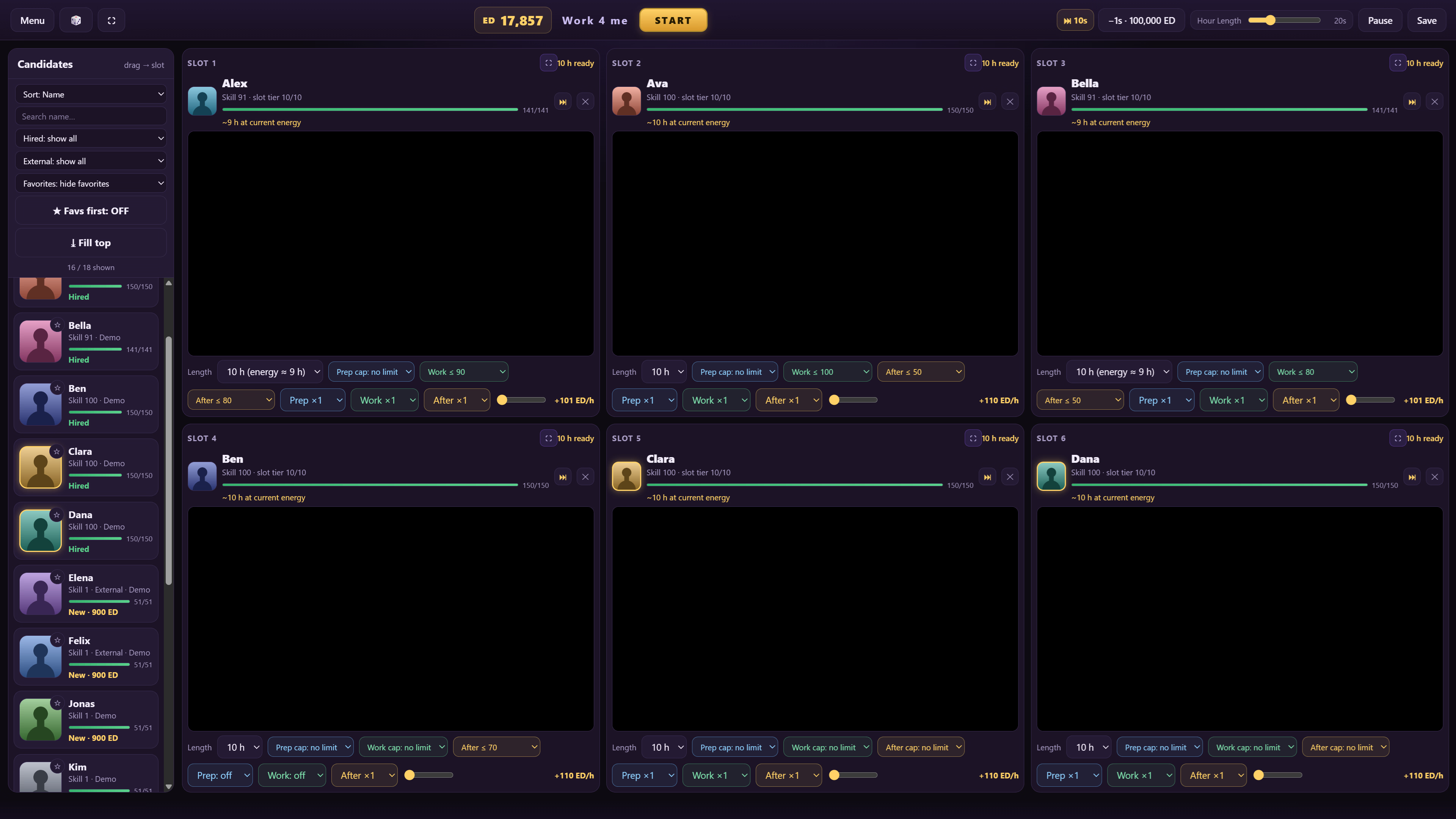
– Fill Top button: one click assigns your currently sorted candidates
into the empty slots. It never spends ED – locked slots are skipped,
so the tier buttons / drag flow stay the only unlock paths. It is
always visible in the candidate bar; with all six slots filled it
just tells you there is nothing to do.
– Live watch: a new button on every slot (the ⛶ icon) opens a big
floating player for that slot while the workday keeps running in the
background. Switch between occupied slots, pause while watching (the
game pauses, the video keeps playing), control the sound, close it
any time. The live player’s volume is independently adjustable, and
the “Auto pause” setting is remembered between starts.
– New fullscreen button in the topbar (and the F11 key): the whole
window goes fullscreen, Esc brings it back.
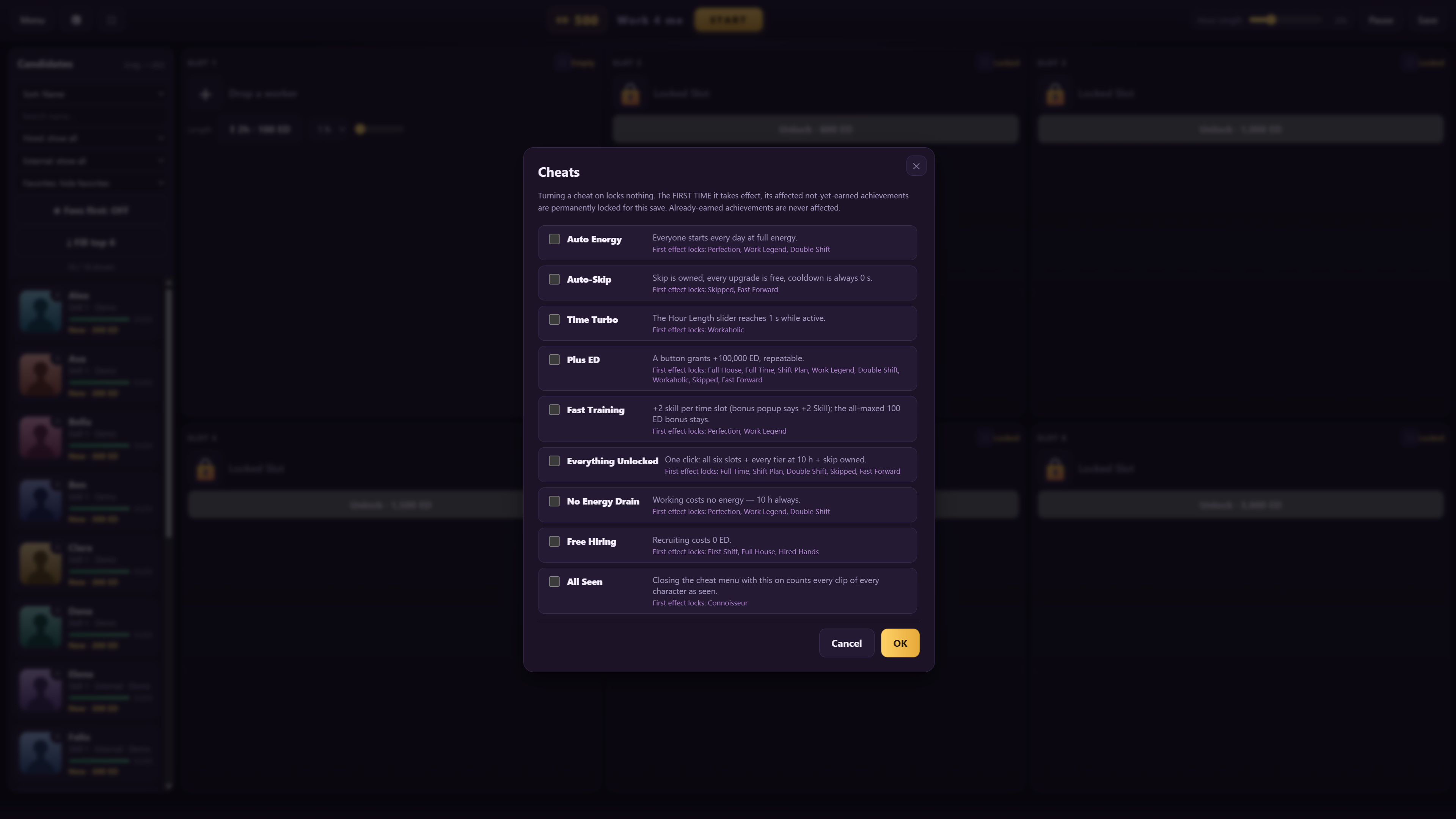
Cheats menu (dice icon in the topbar)
– Nine toggles for people who want to play with the crew without the
grind: auto energy, auto-skip, time turbo (1 s hours), plus ED
(+100,000 button), fast training (+2), everything unlocked (6 slots
+ 10 h + skip in one click), no energy drain, free hiring, all seen
(takes effect when you close the menu with it on).
– Turning a cheat on locks nothing yet – only when it FIRST takes
effect do its affected not-yet-earned achievements become permanently
unattainable for that save. Already-earned achievements are never
affected.
– The menu ends with OK / Cancel: OK confirms your changes and closes
(with the usual warning when active cheats are at risk), Cancel
reverts every toggle you made in the window.
Girlpack mapping, global AND per-character
– I’ve prepared a new Girlpack.txt with a fresh default mapping (it is
in the release and applied on first start).
– It is YOURS to adjust: the format is “<folder> = WORK### / AFTER### /
PREP###” (the built-in file lists every rule type as an example).
– Changed your mind? Just DELETE the Girlpack.txt – the game falls back
to the built-in standard mapping.
– A single character can have its OWN mapping: if a girlpack’s “texts”
folder contains a Girlpack.txt, that file’s rules apply to that
character only – the pack’s rule wins on a matching folder,
everything else still falls through to the global Girlpack.txt and
the built-in standard.
Girlpack filters & sorts
– New: the “Girlpack sort” button in the filter row – it appears
whenever at least one loaded girlpack has a valid Description.json.
– It opens a small panel with the girlpack filters: show all / only
girlpacks / hide girlpacks, appearance filters read from the
girlpack JSONs (body type, bust, hair, eyes, skin – each dropdown
only offers the values your loaded packs actually have), and a
girlpack sort by age or height (low->high / high->low) that overrides
the normal list sort while it is active.
– Characters without a JSON are hidden while an appearance filter is
active, and sink to the bottom of the list under the age/height sort
– they are never removed from the roster.
– The girlpack filter state is saved with the save, like the other
filters.
Candidate list
– Your sort and filter choices are saved per save (New Game resets
them).
– New: “Sort: Random” in the sort dropdown. Picking it (or the
button next to the sort dropdown) shuffles the list with a fresh
random order; the order stays stable until you actively shuffle
again. While it is active, clicking the closed dropdown’s text part
re-shuffles directly, the arrow opens the menu to pick another sort.
The choice (and the current order) is saved per save. An active
girlpack age/height sort still overrides it, like every other sort.
– The current sort value of the candidate list is shown as a small
badge on the avatar (bottom-left corner) – except for the skill and
energy sorts, whose values are already shown.
Video library
– Phase colors: Prep clips are now blue (Work stays green, After stays
gold); the per-slot cap and repeat dropdowns show their phase color
(color in border and text only). A phase can be switched off (×0)
only as long as at least one clip stays playable in the slot.
– Seen/played videos are now tracked by the video itself, not by its
label. Re-mapping Girlpack.txt, moving clips between tiers, or letting
a worker level up no longer makes watched videos “forget” themselves.
Old saves migrate automatically on load. The video library lists
watched clips under their current tier and stays consistent with the
gold avatar border and the connoisseur achievement.
– Unplayable clips no longer block the library: a clip that fails to
play twice (unsupported codec, corrupt file, …) is marked as
unplayable. The mark is stored with your save and survives restarts;
a clip that has ever played is never marked. Unplayable clips leave
the “Unlocked · not watched yet” list and are shown in their own
collapsible “Unplayable (N)” section (starts collapsed) – each row in
red, with the file and its phase (girlpack clips show their
Girlpack.txt-style path), so you can find exactly which file to fix,
convert, or delete.
– The gold border (and the connoisseur achievement) now counts only
the clips that can actually play – a single broken file in a big pack
can no longer block the library completion forever.
– Self-healing: when folders are re-scanned, marks are dropped
automatically if the file was deleted, the character was removed, or
the file changed (for example after you converted it) – the clip is
counted again and plays normally when it can.
– A worker whose video library contains an unplayable clip gets a RED
border on their avatar (candidate list and slots), so you can spot
broken files at a glance. When a library is complete (gold) AND has a
broken clip (red), the border combines: top/bottom red, left/right
gold.
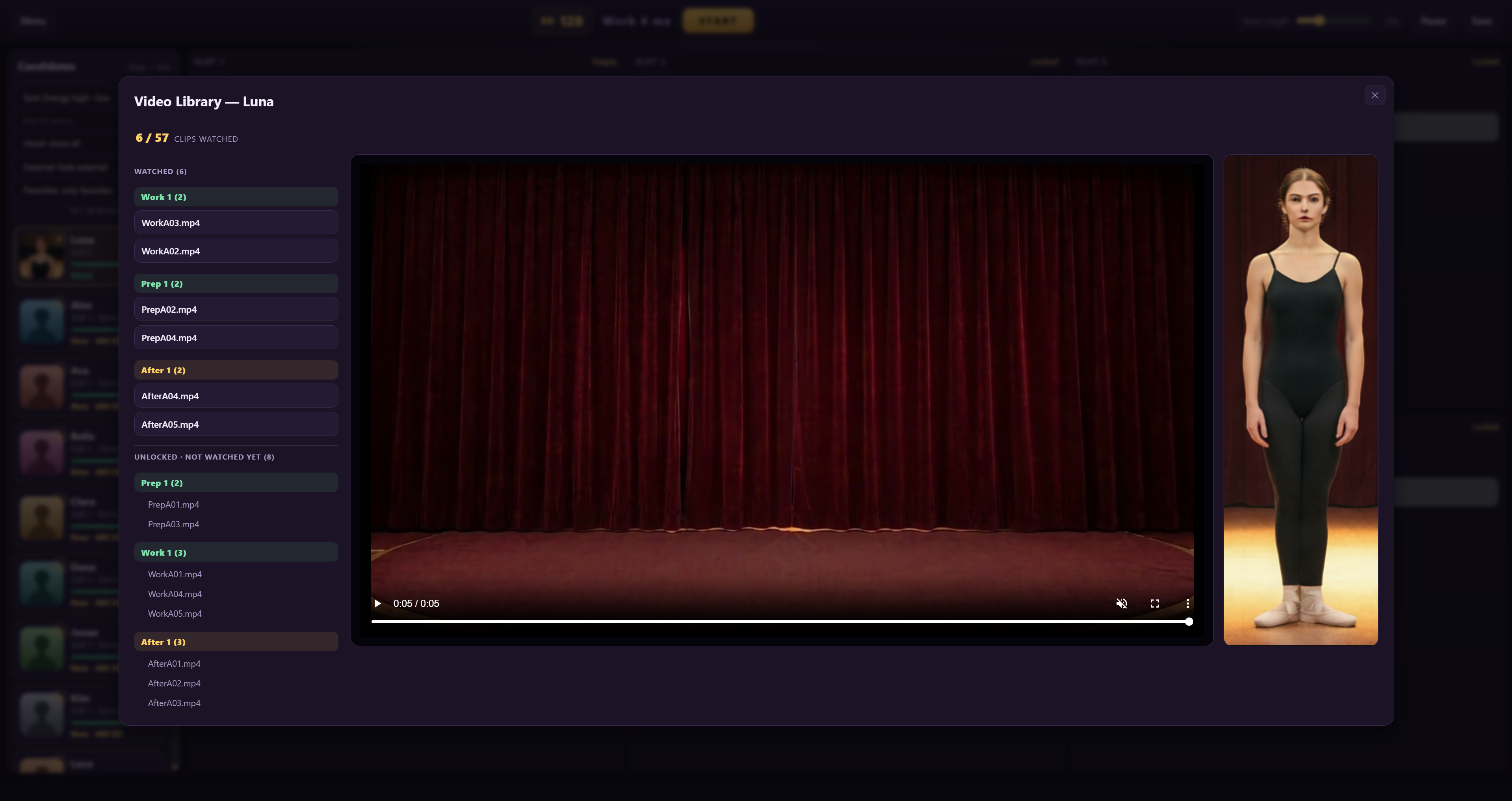
– The video library shows the girlpack JSON values (age, height, body
type, bust, hair, eyes, skin) above the video window; the values are
case-insensitive (BLUE, Blue and blue count the same).
Achievements
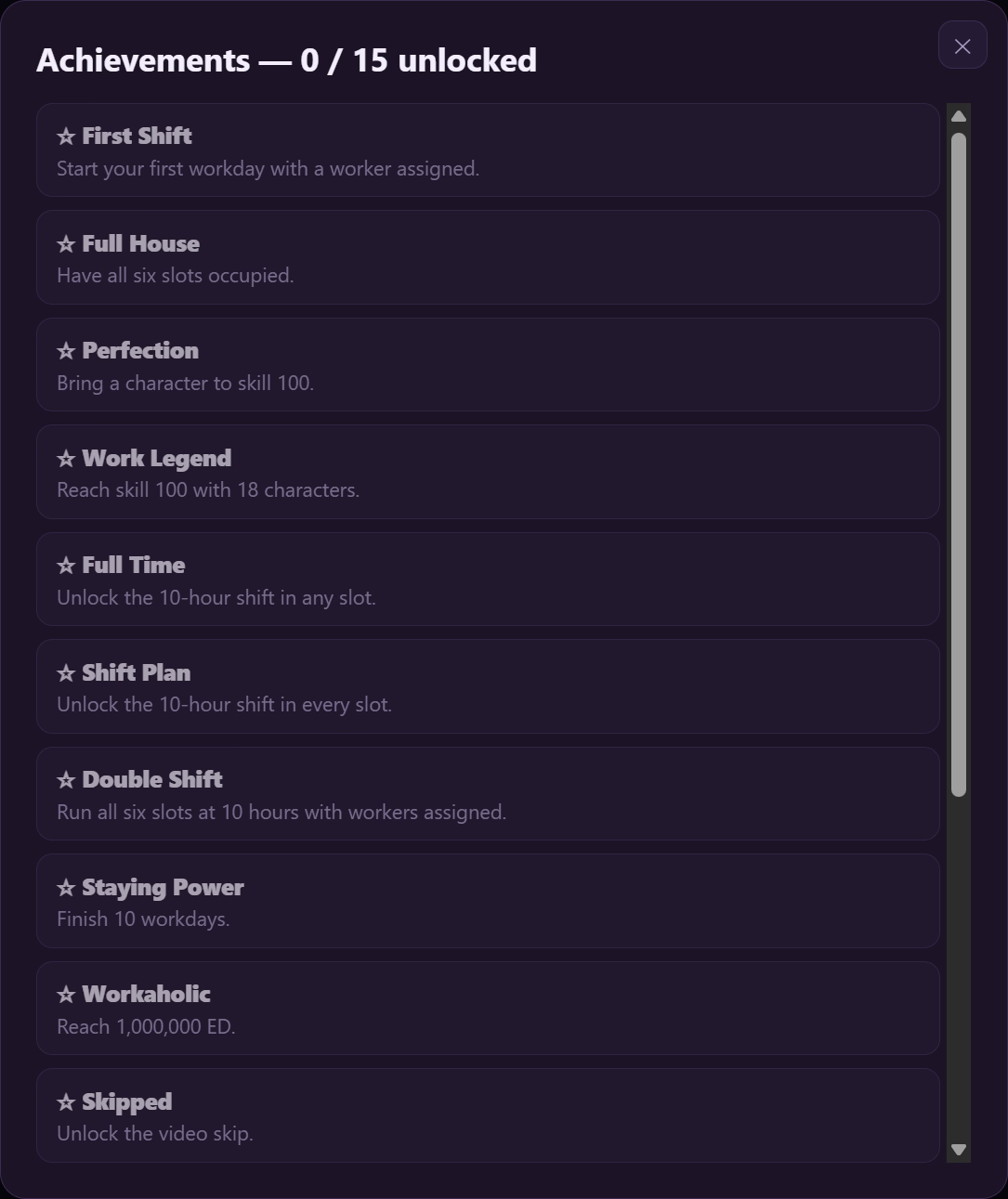
– Three new achievements (12 -> 15): Veteran (finish 50 workdays),
Hired Hands (recruit 18 different workers), and one hidden – you will
know it when you meet it.
Fast start
– Your library is scanned once and the result is cached – after the
first start, the game is playable in seconds, and the library
re-checks itself in the background (the “Syncing library…” indicator
in the top bar). New or removed packs and changed files are picked up
automatically, without interrupting play.
Other
– The shift-length dropdown now shows only your unlocked tiers (no
price line) – the price lives on the upgrade button.
– The demo crew was rebuilt: all six demo girlpacks now carry full
appearance stats, so the girlpack filters work out of the box in a
demo game; every demo worker now has a Prep phase (the work clips
double as prep clips, the way real girlpacks do); and the demo
follows the current PREP/WORK/AFTER folder naming.
Special thanks to the 0.9.x beta testers – see the main menu.
0.8.4 (2026-10-05)
See More
– Fixed: linked folders with capital letters in their name (e.g.
“Girlpacks”) were not readable – every read failed silently and the
scan showed “0 characters”. Folder names are now handled
case-insensitively (reported by antis31, thank you for the deep dive).
– A linked folder that contains no characters now shows a visible
warning instead of failing silently.
– New: “Favs first” ON/OFF button in the candidate list – pin your
favorite workers to the top (suggested by phlore101).
v0.8.3 (2026-10-04)
See More
much faster folder scan, wrong-folder connect fixed
v0.8.2
See More
First release.
Developer Notes:
See More
The game itself contains no adult content and is suitable for all ages — the bundled placeholder workers are abstract color patterns, and the demo clips are abstract animations. It is a player: the character folders YOU connect decide what is played. Video files are streamed locally from your hard drive into the built-in Chromium engine; no network transmission, no telemetry, no auto-updates.
A note on the Prep / Work / After terms: the phase names are deliberately kept SFW, because the game shell is all-ages. A workday plays Prep clips first, then Work, then After — and the mapping decides which of your clips sit in which phase.
A few things players asked for, and where they stand:
– Fullscreen: the game window goes full-screen with F11 or the full-screen
button in the top bar. For one single clip at a time, open the live
watch (per-slot button) or the video library (double-click a worker’s
avatar) — both players have a real full-screen button.
– Working hours: the hours setting per slot is only a maximum. The
workday ends automatically as soon as a worker runs out of energy —
so leaving every slot at max IS the auto mode.
– Saves: your saves live in a “Saves” folder next to the exe (updated
from an older version? they are copied there automatically on first
start, originals kept).
Setup in 3 steps:
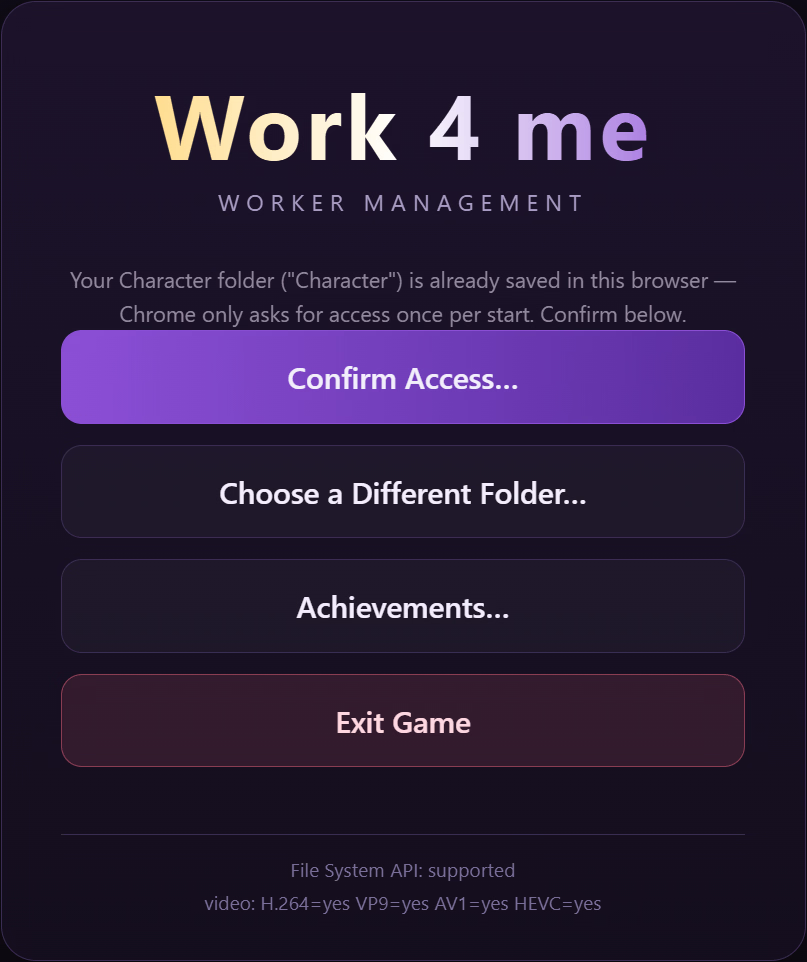
1. Start the game and press “Connect Character Folder” (or drag & drop your character root folder onto the window).
2. Press “New Game”, drag workers into the slots, press START.
3. Done. Standard character folders and Girlpack folders are both auto-detected; the rules file (“Game Info/Girlpack.txt”) is created automatically the first time you hire a Girlpack character.
Changing the menu background
The menu background is loaded automatically from the Game Info folder NEXT TO THE EXE (it is app-wide, not per pack):
<folder with the exe>Game InfoMenu.png
If you updated from an older version, your existing Menu.png is copied there automatically on first start. To change it:
Image in 16:9 (it is centered and cropped to fit).
Save it as Menu.png (exact name).
Put it in the Game Info folder next to the exe (the same folder that contains Girlpack.txt) — just overwrite the existing Menu.png.
Restart the game (or use Import / Refresh) — the new image is picked up automatically.
Note for Linux users: I was not able to test the Linux build — it was packaged on the same codebase, but if it does not run for you, please report it in this thread so I can fix it.
How to create a Character:
See More
You build a character out of FOLDERS. One character = one folder that
contains your images and videos. The game reads the folder layout — there
are no files to write for the character itself.
Put all your character folders into one parent folder (e.g.
“Character”) and connect THAT folder in the game.
— 1. THE STANDARD LAYOUT —
<Name of Character>/
Images/
Head/ any image -> becomes the avatar (name doesn’t matter)
Body/ numeric image names = body image per skill tier
e.g. 10.png is shown from skill 10 up, 60.png from 60 up
Videos/
PREP010/ prep clips, played at skill >= 10
WORK050/ work clips, played at skill >= 50
AFTER070/ after clips, played at skill >= 70
(older folder names SK050/ and AP070/ also work)
loose video files directly in Videos/ also work
Rules:
– The number in the folder name is the MINIMUM skill required.
A worker with skill 50 plays the highest WORK folder whose number is
<= 50. So fill e.g. WORK001, WORK010, WORK040, WORK080 and a low-skill
worker plays WORK001 while a maxed worker plays WORK080.
– Phases cycle in order: PREP -> WORK -> AFTER -> PREP … A phase with
no clips is skipped (a character with only WORK clips works fine).
– A character with just two or three tiers works exactly the same as one
with 90 — the game only uses what exists.
— 2. GIRLPACK LAYOUT —
Existing girlpacks are detected automatically — no renaming needed:
– The folder’s videos/Performances/Work/ tree is read, every clip’s folder
path decides phase and skill tier.
– Clips under a “Finish” folder count as AFTER, everything else as WORK.
– The avatar is images/portrait_small.<ext> (exact name).
The tier for each folder is defined in Girlpack.txt (see below). By
default the standard Venus’s Club folders are already mapped
(dance, pose, foreplay, oral, sex, group, finish…).
— 3. GIRLPACK.TXT (mapping clips to phases and tiers) —
Location (global, shared by all characters):
<folder with the exe>Game InfoGirlpack.txt
Optional per pack (overrides the global file for matching folders):
<your pack folder>textsGirlpack.txt
Format — one rule per line:
<folder path> = WORK### | AFTER### | PREP###
Examples:
Dance/Dance = WORK001
Sex/Doggy = WORK060
Finish/Inside/Creampie = AFTER060
Dance/Closer = PREP05
– The path is relative to Performances/Work/ and uses “/” as separator.
– A rule covers the folder AND everything inside it; the DEEPEST (most
specific) rule wins.
– A pack’s own rule wins for its clips; everything not matched by the
pack file falls back to the global file, then to the built-in standard.
– If no rule matches a clip: a “Finish” folder makes it AFTER, otherwise
WORK — both at tier 40.
– Lines starting with “;” are comments.
– The file is created automatically with the default mapping the first
time you hire a girlpack character. Edit it freely to map your own
packs the way you want.
— 4. AVATARS AND BODY IMAGES —
– Avatar: Images/Head/ (any image) for standard characters, or
images/portrait_small.* for girlpacks.
– Body images: Images/Body/ with numeric file names (1..100). The game
shows the highest numbered body image that is <= the worker’s current
skill — so a character can change appearance as it levels up.
(Girlpacks: a single images/portrait.* is used.)
— 5. TIPS —
– Any video file type the game can decode (mp4, webm, mov, mkv, …).
Unsupported codecs are converted on first play automatically.
– Keep the character FOLDER NAME clean — it is shown in the game.
– After adding/moving folders: menu -> Import / Refresh (a background
sync also picks up new files on the next start).
– The video library (double-click a character) lists the clips per phase
and tier — but only the ones the character’s CURRENT skill has unlocked;
higher tiers show up as the skill grows. If the library looks empty at
skill 1, check whether you filled a tier-1 folder (e.g. WORK001) — or
set the character’s skill higher in the setup to preview the rest.
Features:
See More
– 6 staffable slots, shifts up to 10 hours, per-slot volume control
– Energy system: hourly fatigue, rest recovery, daily regeneration (the
hours setting is only a maximum — a slot stops on its own when the
worker runs out of energy)
– Per-worker phase tier caps and phase counts (x0 – x10, 0 = phase off)
– Skills 1-100 raise clip tier access and income
– Fill Top: one-click staffing of the free slots (never spends ED)
– Live watch: a floating player for any single slot while the workday
keeps running (auto-pause optional, remembered between starts)
– Video skip (buyable, shared cooldown), pause, full-screen (F11 / top
bar button, plus a real full-screen button in the per-clip players)
– Candidate filters + favorites + random sort — all saved per save
– Girlpack filters & sort (appearance, age, height) for packs with a
Description.json
– Fast start: the library scan is cached; new packs and files are picked
up by a background sync
– Unplayable clips (failed twice): red avatar border + own red section
in the video library, self-healing once the file is fixed
– Cheats menu (9 toggles, soft activation with achievement locks) and
15 achievements
– Auto-save after every workday (28 rotating slots) + manual saves,
stored next to the exe
– Built-in codec probe: unsupported clips (HEVC etc.) are auto-converted via ffmpeg
– 18 built-in placeholder workers (abstract patterns) so you can try the game before connecting your own folders
DOWNLOAD
Win: DATANODES – MEGA – MEDIAFIRE – BUZZHEAVIER – PIXELDRAIN
Linux: DATANODES – MEGA – MEDIAFIRE – BUZZHEAVIER – PIXELDRAIN
Win: DATANODES – MEGA – MEDIAFIRE – BUZZHEAVIER – PIXELDRAIN
Linux: DATANODES – MEGA – MEDIAFIRE – BUZZHEAVIER – PIXELDRAIN

![SpaSiBo – Spanking Simulation Box [v1.2] [CitizenCane]](https://hornygames.to/wp-content/uploads/2026/10/6288444_spasibo.avif)
![Autumn Hot Springs Inn: Untold Stories [Final] [Pasture Soft]](https://hornygames.to/wp-content/uploads/2026/10/6577451_1791521856570.avif)
![Walkure Romanze More&More [v1.0] [Ricotta]](https://hornygames.to/wp-content/uploads/2026/10/6595261_1791933803524.avif)
![Gal Big Sister Z [v1.0] [POISON]](https://hornygames.to/wp-content/uploads/2026/10/6579057_134849.avif)
![LesbiAnts – Our New Morphology [v1.0] [astoryinpieces]](https://hornygames.to/wp-content/uploads/2026/10/6589685_1791800521390.avif)
![Formamorph [v3.3.0] [Jake James]](https://hornygames.to/wp-content/uploads/2026/09/6476909_4-alt.avif)
![Corruption of Champions II [v0.9.11] [Savin/Salamander Studios]](https://hornygames.to/wp-content/uploads/2026/09/130368_98776_Cait_Banner_Pic_DCL.avif)
![Chimera Haven: Survivors [v0.2.0] [ShasteGames]](https://hornygames.to/wp-content/uploads/2026/10/6577604_01-title-logo.avif)
![Goblin Hole [v0.2] [DotStockGames]](https://hornygames.to/wp-content/uploads/2026/09/5544956_WalkLogoNude-600x300.gif)
![Elf TD: Lustful monster invasion! Forest village’s great danger! [v1.2] [Lemon dead dragon]](https://hornygames.to/wp-content/uploads/2026/10/5835084_Elf_TD-_The_monster_of_lust_attacks_A_big_crisis_in_the_forest_village_01.avif)
![Mall Creeps [v0.23F] [Kuga_Maru]](https://hornygames.to/wp-content/uploads/2026/09/2303041_Banner.avif)
![SlaveMaker: Prompts and Passions [v0.12.0] [kozosmdev]](https://hornygames.to/wp-content/uploads/2026/09/6333610_Screenshot_2026-07-31_19-19-14.avif)
![Perv Phone [v0.7] [pnh_prod]](https://hornygames.to/wp-content/uploads/2026/09/6417473_patreon-2.avif)